Sections

Tuesday, August 1, 2017

The Past 2016 till now

During my time in AAP I met great people, and since I left AAP to this day, I continue to work with one of those persons. It might be a temporary freelance gig, but it's been a great time working on new and exiting things.

They are AR projects, which has allowed me to learn and working with technologies I didn't have the chance before. After the hit of Pokemon Go now it's become a lot easier to talk about AR, which I feel makes conversation around AR games a lot easier.


One day I would also love to share some of these experiences here, but I can't until these projects don't get out of the oven and make it to the stores.


[j]


Friday, March 3, 2017

Catching Up - Part 2

After what I would call a successful first half of the year (2015), something great happened. I meet the awesome guys of Any Arts Productions and joined them!

Meeting them kinda felt like "fate". The guys at Any Arts have the heart in the right place, they wanted to make games for the love of it and we shared many views of the industry. This gave me a great feeling of connection with them right from the start!

Here is where I directly met Unreal Engine 4. I had known of the engine, but never really gotten into it.
I needed to learn how to use it and quick so I could pass my "trial period" the team had put me into at the begging, it made sense. I knew close to nothing about the engine and they were work only on it at the time. 
It felt very similar to when I started with Unity, picking every little stone and turning it over, and see if I could understand what it did there. Slowly and steadily learning more of how it worked and how this new engine "thinks".

After about a week, UE4 and me became sort of friends. Friends that get along but with different tastes. We wished we both did things in a different ways, but still made progress. Slowly with time we polished those edges and learn to work with each other.
In my head I needed to truly understand how the engine work, how it "think-ed" inside. It's a thing I do... which is why I was always so bad at history and biology back in high-school (too many names and dates). Math and physics came so much easier for me. They "made sense".

One of the things that I liked the most were UE4 Blueprints. Oh boy, how did these guys help me learn and understand the engine faster. Luckily for me, the studio worked mostly with Blueprints only then. All this things combined sort of create an nice environment for me to learn. The combination of a great motivation, a clear goal and it's reward, a great learning environment and the people, all that allowed me to "make sense" of it and get to a basic working level with UE4 in about 2 weeks.


And so, I passed my trial period and was asked to work directly on one of the titles. Here I was given a lot of freedom to experiment and test gameplay options. We wanted to find solutions to gameplay options that didn't quite exist yet at the time. Here was were I had my first dip on Gameplay Programming. And in a simple task like that, I felt in love with Gameplay Programming.


Today I think that Gameplay Programmer is the most artistic way of programming that I know. It takes a very logical process and turns it into a feeling. From something so structured, rational and objective, to something so very abstract as perception and "the feeling" you transmit to the player when they play.


Later on I was tasked on working on the main project, Season of Heaven. They asked to work on one of the mechanics of the main character. This felt huge, they truly cherish this title like a child of them. Everyone involved had this warm feeling when talking and working on this project.
There, by my hands, the "kite" was created. Made from scratch as a test of sorts, with the goal of putting it in the prototype (keep in mind this was 2015).
I might dedicate one day a post to talk about this one if I'm allowed one day, but for now I won't go into details.
I got great feedback from this task, from some really important people in the industry. Creating this features felt reeeeeally good!

By the end of the year I had to stop working with AAP because the work permit I had in the US from being a student in the field expired and I had to sadly return to Chile. The company wanted to sponsor me, but for a new company this things sometimes ain't so easy to do.


It was a great experience in general and even today, the guys of AAP still have a special spot in my heart.


[j]

Monday, February 27, 2017

Catching Up - Part 1

It's been a while... and now that I notice and look back from the last time I wrote something, so much has happened!

So, let's look back at 2015.
During this year I worked on 3 mayor projects, of which I can say only talk about 2 of them. I met a lot of great people and learn tons of new things!

Today, I'll talk a little about this one!


I'm somewhat proud of this project, proud of what I was able to achieve as a new programmer professional. Even thought my experience, I was the lead programmer for this title. This bought many challenges... a new view on some things... and new skills! (Level UP!)

Truth is at first I was scared, yet exited!
Picture little me there, responsible for the whole game's code. I felt so small with such a large task, it was overwhelming...
The amount of control and "power" I had over so many aspects of the game were such that it worried me (I felt under-experienced at the time), but it also gave me freedom to work as I thought was best..
But I wasn't all alone, so as I worked on this, doing things "my way", I would go and check-in or ask for feedback from my pairs. 
I can't say everything went perfect, but for the most part everything went great, and for the rest, they were great chances to learn more!
Every big step I took felt like uncharted territory to me, each came with the fear of failure, the drive for knowledge, and the excitement of the opportunities and possibilities that each step might bring!


Remembering this experience, I can't help to think of how much of a great time it was and how much fun I had!


I would like to also use this opportunity to thank everyone that worked with me back then and helped me to bring this great experience to the virtual stores! Thank you!


[j]

Saturday, May 2, 2015

Curves!

Yesterday, I met a friend.

He told me about using animation curves in the inspector. I always thought animations curves are great, giving you amassing control, but I never thought about using it to control values directly in the inspector for things other than the animations.

Provably not exactly what he had in mind when he told me, but I create a quick script to control the offset of those moving object with a curve. 


The possibilities...!


[j]

Tuesday, March 3, 2015

Path Finding

It's been a while!

Today I want to share something I've been working on. As you might know from my previous posts, I've learned programming on my own mostly and I take programming challenges to learn more about different algorithms and such. This time I want to show you my first approach to path finding.
A little heads up: This isn't A* nor any other, or at least I believe it isn't since I made this without learning the current existent ones.

What my algorithm does is that it looks for a tile's neighbor and evaluates which is close to where I want to go. While doing this it discards tiles that are part of the current path and those that are 'closed'. If the code isn't able to find a way to the destination it tries again ignoring the path that was already tried. Also, after the path has been found (if it is) it optimizes it by removing unnecessary steps, rearranges the steps to make smoother lines and curves and at the end removes overlapped steps.

As you can tell by now, this won't give me the shortest route to a destination, but as a first attempt I am very happy with the result.


Now that I've managed to create a path finding script on my own, I plan on comparing it to what the big path finding algorithms look like. Now that I know how it should be approached, learning how the great ones work will be easier to do.


Hope you liked it!

Now I wonder... where next?


[j]

Wednesday, December 3, 2014

Stage Complete

I been waiting for months to make this post! It got delayed because I didn't know very well how to make it happened, but today it did!


After 3 months of producing our little project, spending many hours of works, many nights of no sleep, many arguments and discussions... at the end we managed to reach our goal, have one of the few (if not the first!) Los Angeles Film School Game Production's final project up on the App Store!

https://appsto.re/us/evVA2.i

It's a small game and does have it's issues, but to us it was a project that made us grow with it.

For only have been 3 persons working on it I feel proud of it. We overcame many challenges. Now we have a little title that I believe will become an important stepping stone for us to build our careers in the industry.


I would like to thank all those that helped us make it happen. Without you, it wouldn't have been the same. Thank you.


Well that's it for now, hope you all had a nice Thanks Giving.


[j]

Tuesday, September 9, 2014

A 4th try with the controls...

Creating gameplay has definitely being one of the things I've enjoyed the most!

I'm skipping the 3rd because it worked horribly for us hahaha
It used the accelerometer to move the camera... and let's just say that it was kinda messing.


This time I took inspiration from Super Mario 64 controls and camera. Of course totally mimicking it wouldn't have worked for me so I tried to get close enough to the point that it would work for me.

This version is the one we liked the most. Still could use some edge softening, but well... 3 months is too little time stay too long in gameplay considering I'm the programmer of our project (can't complain though, I'm enjoying it!).


A bit about how it works.

In this version the pad's center is created where ever the player touches the screen. From there the drag will of that touch will become a Vector2 (x,y) which will be used to give the character it's movement. 
This input is also used to control the direction in which the mesh of the character is facing. To do this I needed an object that could orbit around the sphere.


Now, the invisible sphere on front is what the characters mesh looks at, and the sphere over the mesh is what the player actually controls (our dear sphere from the earlier prototypes).
When I needed to add the camera to the equation it got a bit more complicated. The direction in which the character moves depends on the camera and the rotation to where the camera needs to rotate after the player stops moving depends on the character.
The camera also orbits around the player in the same way I described above and will only adjust if a few conditions are met (like letting movement touch go).

Luckily this is much easier to explain here than to actually make it with work all the things that are going on under the hood, but it was a fun challenge. The important thing was to make it behave in a way the player would "feel it more right".


I just great memories of this project, it's was a great learning experience!


[j]

Saturday, July 26, 2014

Board Game

At first, I thought of this blog as a corner in the web, where I would present to you what I have accomplish and learned about game programming. Now I realize that it should be about all I've learned about games, game design, and of course also programming.

From Martin Hagvall, an awesome great teacher I had, I learned the basics of game design. In one of the classes with him we had the opportunity to face the challenge of creating a board game. A one month assignment that taught us a lot!

So this time I want to show you a bit what me and 2 other classmates came up with.


I present you Shift Rifts!


This game is about planning your moves and placing your pieces to gain the advantage and control specific points on the board to win the game. This is a 3-4 player game and is purely strategic.

As you can see in the picture the game has a strange shape. What you see is actually 3 boards matched together. On each board you will see purple tiles which are the points you want to control with your pieces.
I won't go deep into the rules, but basically you take turns and use your actions to move your pieces around the board or spawn units with currency you get every turn.
Every 3 turns circles the game enters a bidding face to gain the privilege of shifting the boards. This allows a player to choose one board and rotate clockwise 1 position. Moving a board will make the piece move with it. As you can imagine this can greatly affect the flow of the game.


The game ends when a player has control of a determined number of Control Points (purple tiles) or a board has reached a full cycle.


This was a great experience! I always remember it fondly and feel grateful that I had the change to have him as teacher while at school.


Thanks again Martin for sharing all that knowledge with us. This was an amassing game design experience that taught me a lot.


[j]


Sunday, July 20, 2014

Better use 1

Hey there,

We had another, more classic, approach to the controls. This time I'll present you this little video (sorry about the quality) with a single pad and 2 buttons. I do realize that using a copy of console controllers looking inputs on a touch device, but well, we are working with it because it was going to be a pc games first then for learning purposes became a mobile game I think... 


Anyway!


With this layout I engaged on a new challenge. I wanted my touch inputs to work in an specific way. 
First, let me say that Unity touch inputs are not that great. So for this part I wanted to create a way to detect touches on my GUI textures and associate that touch with that texture so you would not be able to hold that touch, drag it and end up touching and activating a different button. So if I tap the pad and happen slide my finger all the way to the jump button, the  jump button would not react to that touch. I also added to this system a way to detect if my interface button (not the touch itself) was pressed, held or released.

Uff.. it wasn't as simple as I thought at first, but I got it and am so happy to have been able to create my own system for this!

(The silly music is to cover background noises, nothing is said so you can just mute if you like)


Can stop having fun with this things!
Till next time,


[j]

Thursday, July 10, 2014

2 Pads?!

Today I managed to get 2 Pads working on my iPhone! Totally exited about this!
The hardest part was to understand the way that Unity handles screen touches and be able to control both separately. At first I was getting problems with the ids of touches and the way I was using them, but I did find a way to make this work. 

Had so much fun and it was so exiting to see the result work!


This isn't the final layout of the controls, it was just my first attempt.
Hope you like it as much as I'm enjoying it!


[j]

Saturday, July 5, 2014

[1/3]

And so, a month past.
We did things right and we did things wrong. We spend more time than needed on many things we had to work on. We made mistakes. We found problems.
But we also learned a lot. We organized ourselves. We saw in our mistakes an opportunity to learn and improve. We found solutions to our problems.


It was good month!


Biggest challenges this month are the touch controls for the phone, and innovate and create the levels.


Still exited!


[j]

Monday, June 9, 2014

Make progress every day

Just like a dear teacher of mine said, "Make progress every day".

Today I wanted to create the controls for moving upwards on walls for our character. 
This , once again, is something I've never done before. Still, after 6hrs of non-stop work and some 3D math refreshing, I managed to make my own system to accomplish this.

This is how I pictured it.
First I must say, that our character moves (when he is small) by pushing with using the physics engine of Unity3D. Now, I needed to find a way to push him parallel to the surface with was standing on at all times. My thought was to use the normal of the contact point of the surface to then generate a force in the perpendicular corresponding direction. I have no idea if there are advanced Unity function to do this, so I made my own.

I'm so happy to say that I did manage to make it work! Our character can climb all the surfaces with wanted to.


That's today progress, until next time.


[j]

Tuesday, June 3, 2014

Green Lit!

That's right! My project idea got the "Go" to become our final project!
I'll be working with 2 other classmates and we will work on an idea that was born out of the "Love O Love" prototype. Gladly it won't need to be love related this time (no game-jam that needs to be matched to) and it will be related to water.

The idea is that you will control a drop of water that can change it's size and become steam, water and ice to destroy the buildings of the bad guys.


Heres is a few concept art of the main character.


The goal is to make it work for a mobile device. This is something totally new to me and I'm very exited about it. I'll be working as producer, lead programmer and lead art. Here is an interface mock-up (you will provably recognize the map from the prototype).


I won't spoil it too much, but I'll keep you posted ;]


[j]


Tuesday, April 29, 2014

Me lately...

It's been a while since I post something, so I decided to update telling what I been up to.

In the current class, we been working on a small prototype. This time I worked in a group and we decided we wanted to build a 2-4 player game for console with split-screen.
I'm working a lead programmer and producer, and I must say, it's been lots of fun!

As with every challenge, I like to start from scratch, not using any outside scripts or code. Everything went normally when it came to the controls because I already had learned a bit about mapping controllers to Unity. This time though, my script detects if the game is been play on MAC or PC and changed the inputs accordingly.


Success!


The biggest challenge was to make a game where depending the amount of player the screen would split in the right way.


Success!!


After having that I made a simple character to start testing animations and a few animations for the character to use.


The animations are very raw (just a few hours of work) and are currently implemented in the game. Happily we get to see our blockie test character run around the stage!


So... currently we have a prototype that includes 2-4 player split screen, menus, character selection and hero selection (we have 2 things player have to pick, even though there is no impact in gameplay with the selection), projectiles, spawn/respawn, timer, score, sound and music management, inputs mapped for MAC and PC. All this was done during April.


I would have uploaded builds, but the prototype needs controllers to be played currently. I plan on making a raw version of it were a single player can play against a stationary character just to get a feel of the prototype.


[j]

Saturday, February 15, 2014

Check out a bit of movement.

Today I'm sharing a build of this prototype where you will see a 1 day model/rig/animation character moving in the game.
When makings I learned a lot about the Unity-Maya relationship. Now that I know how to work with different animations and use Unity's Animator, things are getting more and more interesting!

In this version I added:
- A High Score.
- Show/Hide controls.
- Conceptual 3D model.
- Animations for that model.
- Pop up instructions for the "launcher" (red thing).


Hope you have fun!


i0.6


PD: People call it "The Armadillo game" :]

Thursday, January 30, 2014

A new Iteration [Love O Love]


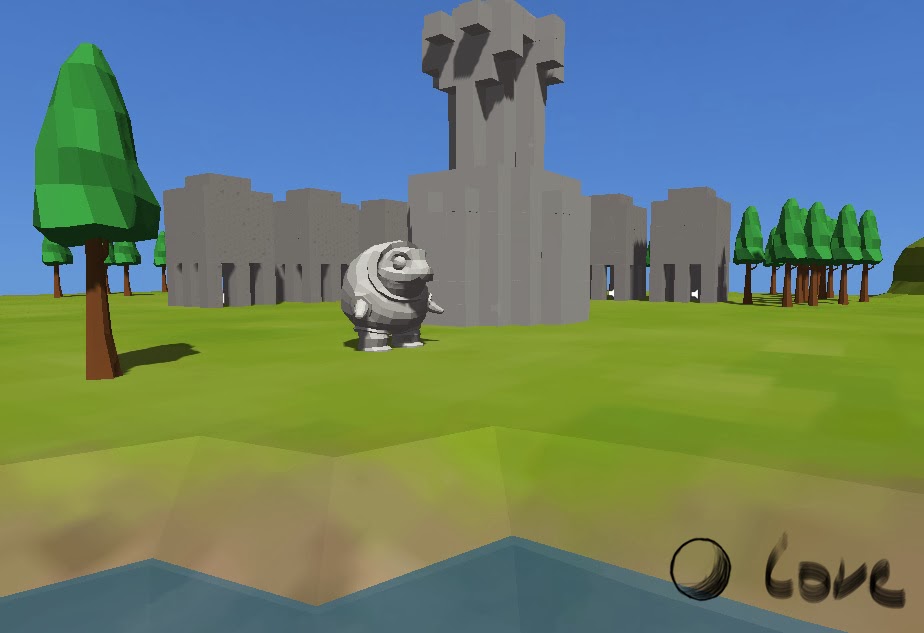
Today I present you, Love O Love Iteration 2! (I think I want to change the name already...)


This version has a few changes, some that you will see and some that you won't. 
Things you will see: 

- There is a new Main Menu.
- You will see a short and quick tutorial at the begging when you start a new game.
- Graphics (art) improvements. One building changed it's shape a bit an another completely. Added a few color to the level.
- There is now a blue platform that you need to step one when you are done with the stage. It will still give you your time since there is no other level to add yet.
- Now the launcher looks like a red cone.
- Trees!? Trees!

Things that you will not see:
- The player is slightly faster and heavier.
- Pillar collision detection is deactivated after triggered.
- Launcher now sets you on top and waits for you to press SPACE to be launched. You will be able to aim better this way.
- Objects that fall out of the world will be eliminated. If you fall you will respawn, so don't worry!
- Audio Manager. First setup for managing sounds.

Side note: consider the red blocks as the buildings "cores". When that falls, the building counts as destroyed.


That's it I think...

Look forward for the next step!


Play Love O Love i2
(You will need Unity webplayer to play this)


Having problems running the game? Check this:
- Did you install Unity Web Player? (Link to it)
- If you are using Chrome, try re-sizing the screen (Weird, I know)
- Tried a different Web Browser?
- Still nothing? Leave a comment explaining what is your problem so I can help ;]

Tuesday, January 28, 2014

Just a bit of color

Well, just as the title says.
I added to Love O Love some color to my "testing grounds".

I love the way low polys looks!


Monday, January 20, 2014

A small side note

I never mentioned it, so if anyone wonders why all prototypes and codes are so different, that is because I make every prototype/game from scratch without using any plugins nor downloaded pieces of code.
I like to do this because I feel I can learn the most this way.

No challenge no fun, right? ;]

Another Small Game Prototype

I had a great week last week!
Today I wanted to share another game prototype I made. I spend a bit more than only 24hrs on this one.

In a month Valentine's Day is coming up. So I planed this prototype with the theme of "love" in mind.

"Love O Love is a game where you play an armadillo that was been used for military genetic experiments. Together with his girlfriend, both are subjects of painful tests every day. 
One day, since the "male subject" was not giving good result, he kicked out of the program and is ditched in the sewers. Angry and worried he decides to go look for his beloved and rescue her from her painful captivity.
As our hero gets out of the sewers, he finds himself in the city. But, the city look peculiarly smaller than he remembered. Not just the city.. but everything looked smaller. Then he noticed! He was the one that actually grew!

With his new size, he take on the human kind in order to safe his love."

Take as references:
- Sonic the Hedgehog 
- Rock of Ages
- Angry Birds
- Godzilla
- King Kong


I'm really happy with the result of all the coding I did. I never tried to work with physic torque before but I feel the result is quite decent!
I also experimented with click+drag to rotate the camera. It works ALMOST perfectly. I had to go all over the math behind it... I really needed the math review on some topics!
Still on this prototype I disabled the click+drag so you don't need to click anything and just move the mouse to rotate the camera. 

The current stage of the prototype only gives you a small level, no edges (so don't fall out), 16 buildings to break down and a timer that will tell you how long you took. Look at the red pillars, those need to fall for the building to count as destroyed.
It's not much, but you can get an idea where this is going.

Controls:
ASDW + Mouse

Here is the link:
Love O Love
(You need Unity Web-player to play this)


I hope you enjoy it!